Change a password
You can change your password when you are logged in to your Destiny Fundraising Manager account. Or reset a forgotten password.
1. In the top-right corner, hover over the down arrow, then click Settings.
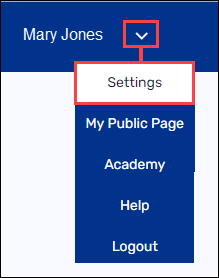
2. Under ProfileSettings, click Personal Information.
3. Next to Password, click Update. New fields appear.
4. Under Password, enter the current password. Then, enter and re-enter a new password.

5. Click Save.
For additional help, contact techsupport@follettsoftware.com.