Edit a pending campaign
If you have created a campaign, you can edit it. You cannot edit campaigns that others have created.
You can also edit a campaign that is already published.
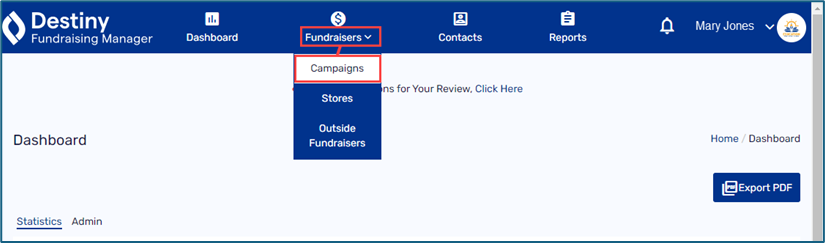
- In the header, select Fundraisers > Campaigns.
-
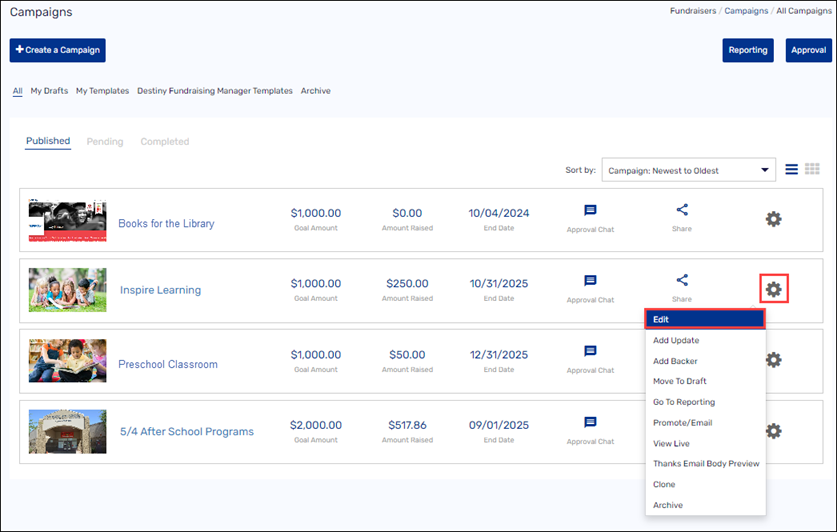
Under Published, Pending, or Completed, find the campaign you want to edit.
- Select the gear icon >Edit.
Note: This option will not appear unless you created the campaign.
-
Make any desired changes to the campaign details.
-
Do any of the following:
-
To repost your updated campaign, click Publish.
-
To see how your campaign will appear to donors, click Preview.
-
To complete the campaign details later, select Save As > Save As Draft.
-
To save this setup for a future campaign, select Save As > Save As Template.
-
See Create a campaign.
For additional help, contact techsupport@follettsoftware.com.