Manage your school's Public Page
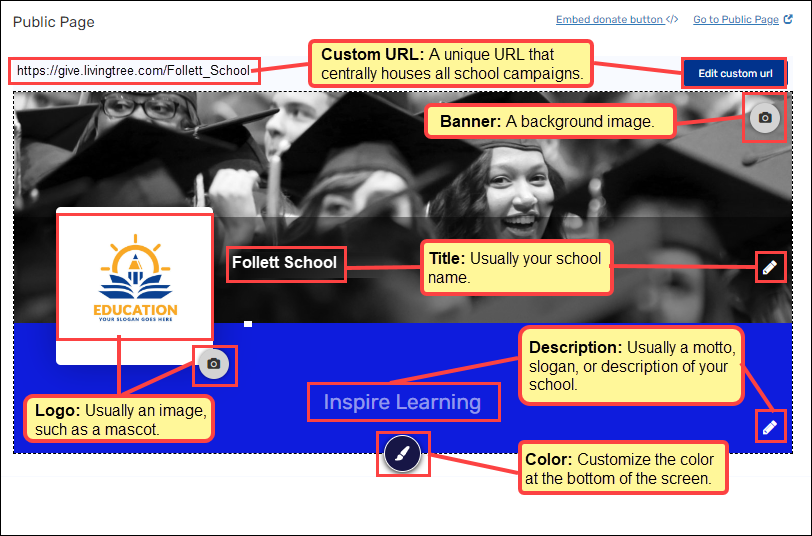
The Destiny Fundraising Manager has a Public Page that centralises access to all campaigns you have published. You can edit the URL, title, description, logo, and banner image.
Note: On the Public Page, teachers will see their campaigns, School Admins will see all fundraisers for their school, and District Admins will see all fundraisers in the district. Bookkeepers who can’t create a campaign will see their school’s fundraisers.
To view or edit your Public Page:
1. In the top-right corner, hover over the down arrow, then click Settings.
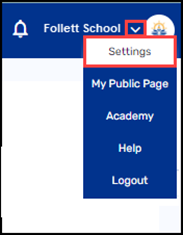
Note: You can also see your Public Page by hovering over the down arrow and then clicking My Public Page.
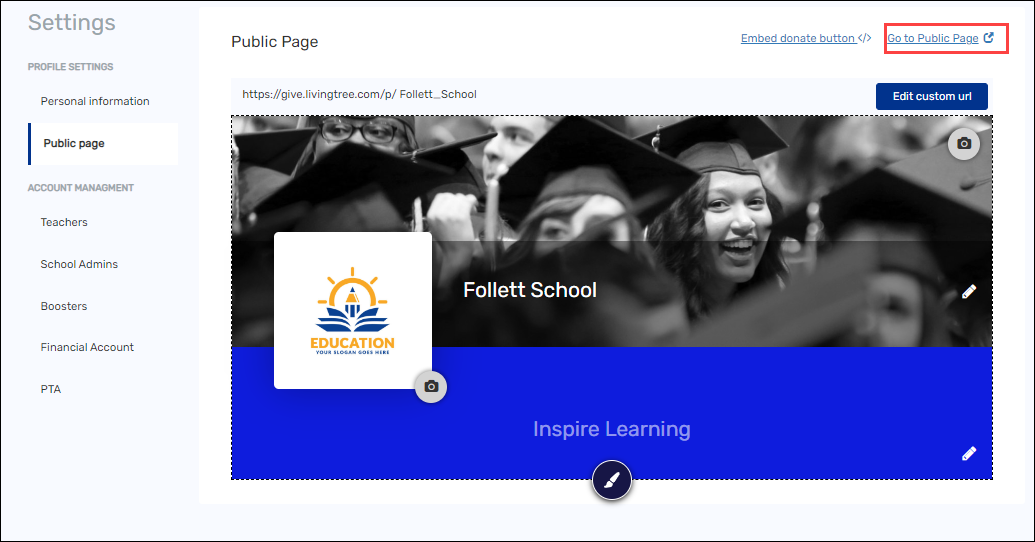
2. Under Profile Settings, click Public page.
3. Do any of the following:
-
To view your public page: In the top-right corner, click Go to Public Page.
-
Your public page opens.
-
To edit your public page:
|
If you want to edit the… |
Then… |
|---|---|
|
Custom URL Note:
|
a. In the top-right corner, click Edit custom URL. b. Enter your desired URL. c. Click OK. |
|
Banner |
a. In the top-right corner, click the camera icon. b. Click Upload banner picture. c. Choose the file you want. d. Click Open. |
|
Title Note: You can use your school's name. |
a. In the right-centre, click the edit icon. b. Enter the title you want. c. Click OK. |
|
Description |
a. In the bottom-right corner, click the edit icon. b. Enter the description you want. c. Click OK. |
|
Logo |
a. In the bottom-left corner of the logo section, click the camera icon. b. Click Upload profile picture. c. Choose the file you want. d. Click Open. |
|
Color |
a. At the bottom-centre, click the paintbrush icon. b. Select the colour you want. |
For additional help, contact techsupport@follettsoftware.com.